

Set of tools for creating, altering and inspecting the Matroska file format. Split , merge, extract and get information about MKV video files. It also supports video codecs and subtitle formats.
Matroska (MKV) files have become the de facto standard for compact HD video files. To create MKV files from various sources or to modify the structure of existing Matroska files, MKVtoolnix offers an open-source solution to inspect, modify, or produce new MKV files with the audio, video, and subtitle streams of your choice.
Actually, MKVtoolnix is not one tool but a toolbox that integrates various Matroska-related open-source utilities. Mkvinfo provides you with a list of all the elements contained in a Matroska file, its tracks, and even the codecs used. Mkvmerge joins the streams of various media files in a single MKV file, while Mkvextract performs the opposite operation – it takes out a selected stream out of the container and save it as a standalone file. Mkvpropedit is used to modify the properties of an MKV file without extracting its contents or build a new one. With this utility, you can change the segment information elements (such as the title) and the track headers (the default track, the language code, etc.).
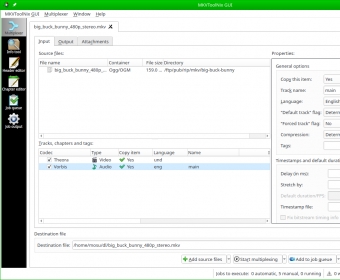
All of these functions are wrapped up in a convenient interface called mkvtoolnix-gui. This GUI turns all those more or less cryptic program names into more accessible options and tags, such as Multiplexer (to create new MKV files), Info tool, Header editor, or Chapter editor. Useful as it is, the interface itself (and some of the language used in it) is not the most straightforward video tool you may come across. Designed by experts, it does seem to be designed also for experts or, at least, for those who really know what a MKV file is and how it works internally. If you want to make the most of the various tools included in MKVtoolnix, you will need to do your homework first.
One great thing about this tool that all users will surely appreciate is its batch-oriented working flow. The last two tags in the program’s main interface, namely Job queue and Job output, will let you design all your multiplexing or stream extraction one at a time and launch them all in one single operation. Given that some of these operations may take some time to finish (especially if you use large BD video files as source), this batch processing approach is certainly a great add-on to this suite of tools.
Do not mistake this program with the average video conversion and compression tool – MKVtoolnix gathers a set of professional and high-quality MKV-related utilities aimed at video connoisseurs looking for an uncompressed HD video compact container for their beloved movies and other video files.






Comments (3)
if they add in ability for more video types to be muxed into mkv container it will be even more perfect.